


Building a website today comes with many choices, and picking the right platform can feel overwhelming. Two of the most popular options are Wix and WordPress. Is Wix similar to WordPress? Both are widely used, but they serve different needs and have unique strengths.
This article breaks down the key differences and similarities between Wix and WordPress. From easy-to-use tools to advanced features, this guide will help you choose the platform that fits your goals and makes creating your ideal website easier.
Overview of Wix and WordPress
When deciding on a platform to build your website, it’s essential to understand the key features, strengths, and limitations of Wix and WordPress. Both are widely used, but they cater to different users with varying needs, technical skills, and long-term goals.
Wix
Wix is a popular website builder that makes creating a website simple and accessible, even if you don’t have technical experience. It offers a variety of tools and features that are perfect for beginners, providing a smooth and easy experience from start to finish.
Advantages of Using Wix
- Ease of Use: Wix’s drag-and-drop editor is easy to use, allowing anyone to build and customize a website without needing to write any code. The simple interface makes it easy to add, move, and edit elements on your site.
- Pre-Designed Templates: Wix offers a wide selection of professionally designed templates for different industries like e-commerce, portfolios, blogs, and business websites. These templates are highly customizable, so you can create a unique site that fits your needs.
- All-in-One Solution: With Wix, you don’t need to worry about finding a separate hosting service or managing a domain. Everything is built into the platform, making the setup process smooth and hassle-free.
- Flexibility: Even though Wix is beginner-friendly, it still provides plenty of flexibility in design and functionality. You can add various apps and features from the Wix App Market to improve your website’s capabilities.
- Mobile Responsiveness: Wix ensures that your website looks great on all devices—smartphones, tablets, and desktops—automatically adjusting the layout for the best user experience.
- Customer Support: Wix offers excellent customer support through live chat, email, and a detailed help center. This is especially useful for beginners who might need guidance during the setup process.
WordPress
WordPress is one of the most popular and versatile content management systems (CMS) used by millions of people around the world to create websites. It provides a powerful platform for building everything from simple blogs to complex e-commerce sites.
Advantages of Using WordPress
- Ease of Use: While WordPress has some advanced features, its user-friendly interface makes it easy for beginners to get started. The intuitive dashboard lets you manage your content easily—whether you’re adding posts, pages, or customizing themes.
- Flexible Customization: WordPress offers a high level of customization. You can choose from thousands of free and premium themes and plugins to create a site that fits your needs perfectly.
- Open Source: Being open-source means WordPress is always improving thanks to a large community of developers. Regular updates, security enhancements, and access to a variety of plugins and themes make it easy for beginners to find solutions to different website needs.
- Extensibility: When you need SEO tools, contact forms, or an online store, there are countless plugins available. This makes WordPress a flexible platform that grows with your website.
- SEO-Friendly: WordPress is built with SEO in mind, helping your site rank better on search engines. Beginners can optimize their content easily with built-in tools or by adding plugins like Yoast SEO to improve visibility.
- Community Support: With a large community of users and developers, WordPress offers great support. There are plenty of forums, tutorials, and online resources to help beginners learn how to use the platform and troubleshoot issues.
Wix vs. WordPress: A Comprehensive Comparison
Choosing between Wix and WordPress can feel tricky because both are great in their own ways and suit different types of users. Wix is simple and easy to use, while WordPress offers more flexibility and advanced features.
To help you decide, we’ll break down how these two platforms compare in important areas so you can choose the one that’s best for your website.
1. Customization Options
Wix
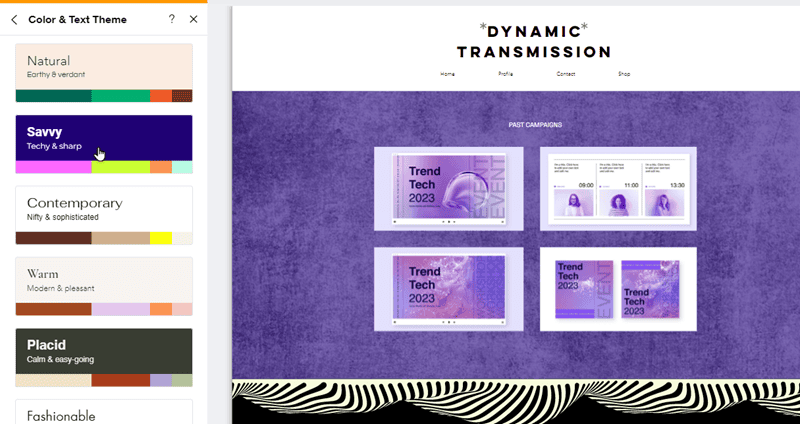
Wix comes with plenty of ready-made templates that you can tweak to fit your style. You can change fonts, colors, and layouts, but your control is somewhat limited compared to WordPress. Also, once you pick a template, you’re stuck with it—you can’t switch to a different one without starting over.
WordPress

WordPress takes customization to the next level. There are thousands of themes and plugins available to make your site truly unique. If you know a bit of coding, the possibilities are almost endless. Even if you don’t, tools like Elementor make it easy to customize your site without needing technical skills.
Verdict: WordPress offers far more flexibility and customization options, making it ideal for users who want complete control over their site.
2. Ease of Use
Wix
Wix is made for beginners. Its drag-and-drop editor is super simple. Just move things around, and you’ll see the changes instantly. No coding or technical know-how is required, making it ideal for anyone new to building websites.
WordPress
WordPress isn’t as beginner-friendly. While its dashboard is pretty straightforward, you’ll need to get familiar with themes, plugins, and maybe a bit of code to fully customize your site. That said, with some practice, most people can get the hang of it.
Verdict: Wix is better for beginners who want a quick and easy setup, while WordPress might require a bit of learning.
3. Pricing
Wix
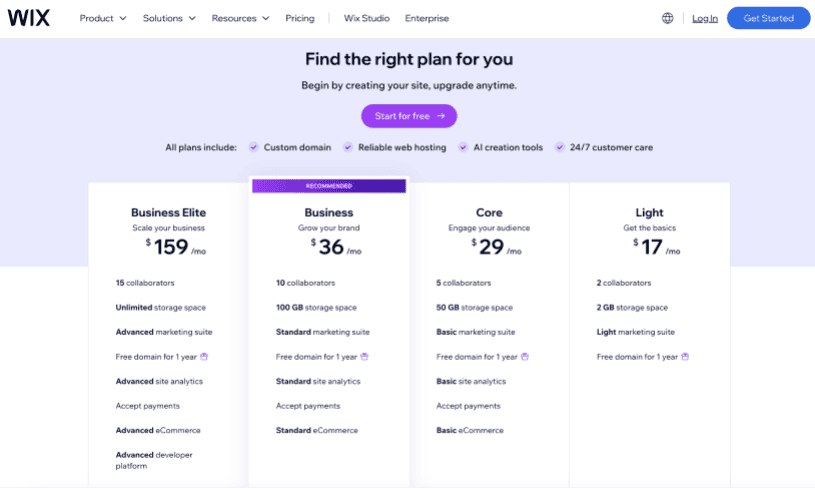
Wix has plans for all kinds of businesses, whether you’re just starting out or running a big company. Each plan gives you the tools to build and manage a professional website. Here’s a simple look at what they offer:
Business Elite
The Business Elite plan is great for larger businesses or enterprises that need advanced features. It includes space for 100 collaborators, unlimited storage, and tools to run powerful marketing campaigns.
You also get a free domain for the first year and advanced analytics to track your website’s performance. With this plan, you can accept payments, use advanced eCommerce tools for your store, and even customize your website using Wix’s developer platform.
Business
The Business plan is a good fit for growing businesses. It supports up to 10 collaborators and offers 100 GB of storage. This plan includes a free domain for the first year and tools for running standard marketing campaigns.
You can also track your site’s performance with analytics, accept payments, and use standard eCommerce tools. It’s a solid option for businesses that need more features without going all-in on advanced tools.
Core
The Core plan is designed for smaller businesses or teams. It allows up to 5 collaborators and provides 50 GB of storage. You get basic marketing tools, a free domain for the first year, and analytics to see how your website is doing. It also lets you accept payments and use basic eCommerce tools, making it an affordable choice for those starting out.
Light
The Light plan is perfect for freelancers or personal projects. It’s simple and budget-friendly, with space for 2 collaborators and 2 GB of storage. You also get a light version of Wix’s marketing tools and a free domain for the first year. While it’s more basic, it’s great for creating a professional-looking website without spending too much.
WordPress
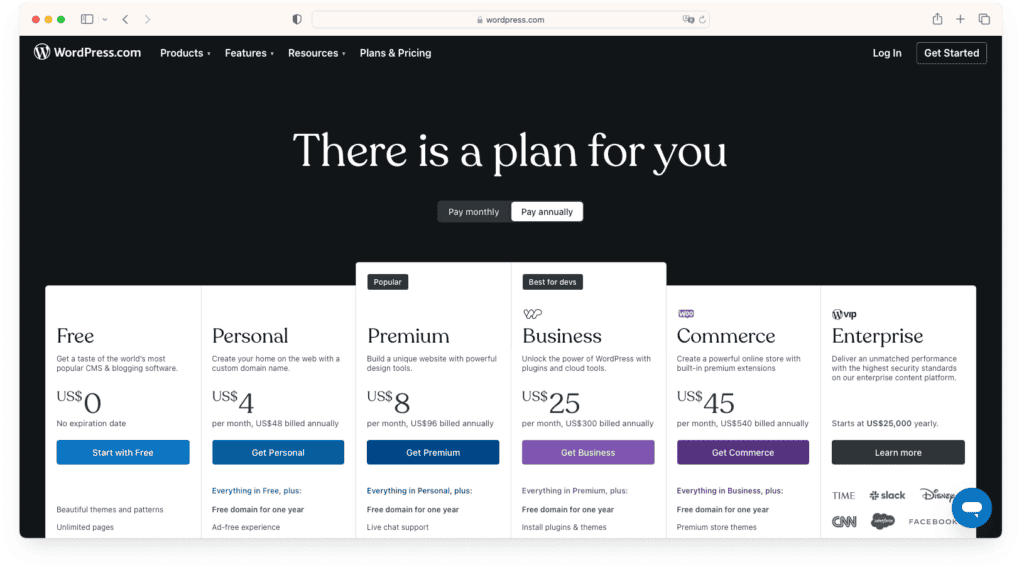
WordPress offers a range of plans tailored to meet the needs of individuals, businesses, and online stores. Whether you’re starting a personal blog or running a large eCommerce site, there’s a plan designed to support your goals. Here’s a breakdown of the key features in each WordPress plan:
Personal plan
Ideal for beginners and hobbyists, the Personal plan offers the essentials to create a professional-looking website. Key features include:
- Unlimited pages, posts, and users
- Free domain for 1 year
- Ad-free browsing
- Dozens of premium themes
- Fast support
Premium Plan
The Premium plan offers everything in the Personal plan, plus additional customization and analytics tools for a more personalized experience.
Business Plan
The Business plan is a robust option for growing websites that require advanced functionality. Features include:
- All features of the Premium Plan.
- Access thousands of WordPress plugins to expand your site’s capabilities.
- Get help whenever you need it, with faster response times.
- Includes SFTP/SSH access, WP-CLI, Git commands, and GitHub deployments for advanced site management.
Commerce Plan
The Commerce plan is specifically designed for online stores, providing powerful tools for eCommerce success. Features include:
- All features of the Business Plan.
- Access premium templates optimized for online selling.
- Includes WooCommerce hosting and features to manage inventory, payments, and more.
Verdict: Wix is great for straightforward pricing, while WordPress offers more control over your budget.
4. Website Design
Wix

Wix has over 800 professionally designed templates that are ready to use. They’re perfect for beginners who want a good-looking site quickly. The downside? Once you choose a template, you can’t switch without starting over.
WordPress

WordPress offers thousands of themes, ranging from simple to highly detailed. These themes can be fully customized, and developers can even create unique designs with custom code.
Verdict: Wix is great for beginners who want a polished design fast, but WordPress is better if you want more creative freedom.
5. SEO (Search Engine Optimization)
Wix
Wix has a lot of great SEO tools that are easy to use, whether you’re a beginner or an expert. These tools help your website rank higher on search engines and make it easier for people to find you online.
Here’s a simple rundown of what Wix offers:
- Robots.txt Editor: Wix auto-generates a robots.txt file to guide search engines and lets you edit it to highlight key pages.
- Structured Data: Wix adds structured data to pages like blogs and products, making your site eligible for rich search results. Customization is also possible.
- Server-Side Rendering (SSR): Ensures search engines can easily read your site by creating optimized page versions.
- URL Customization: Edit page URLs for SEO, with automatic updates to sitemaps, redirects, and tags.
- Custom Meta Tags: Generate and edit titles, descriptions, and tags to improve search visibility.
- Canonical Tags: Wix sets default tags to avoid duplicate content but allows custom edits.
- Social Sharing: Customize how pages appear on platforms like Facebook and Twitter with tailored titles, descriptions, and images.
- SEO Dashboard: Manage settings like meta tags and URLs from one place for efficiency.
- XML Sitemaps: Wix updates sitemaps automatically to help search engines find your content.
- 301 Redirects: Easily redirect multiple URLs manually or with bulk uploads.
- Bot Logs: View reports on search bot activity to troubleshoot and optimize performance.
- Fast Loading: CDNs ensure quick site loading for users everywhere.
- Image Optimization: Automatically compress images for speed and SEO, using WebP format when possible.
- Mobile-Friendly: All sites are mobile-friendly, with advanced responsive options in Editor X.
- Developer Tools: Use SEO APIs to customize settings and automate updates.
- Google Business Profile: Manage your profile directly from Wix to boost visibility and track reviews.
- Site Inspection: Check page indexability and fix ranking issues with ease.
- Multilingual SEO: Optimize settings for sites in multiple languages.
WordPress
WordPress makes it easy to improve your site’s SEO and get noticed online. Here’s why so many people choose WordPress for boosting their site’s visibility:
- Custom Titles & Descriptions: Your page title and description are often the first things people see on a search results page. WordPress lets you edit these easily. No coding required, so you can grab attention and stand out from competitors.
- Automatic XML Sitemaps: Search engines use sitemaps to find and organize your site’s pages. WordPress automatically creates and updates these sitemaps, saving you time and ensuring your site stays search-engine friendly.
- Clean URLs: Messy URLs can confuse both search engines and visitors. WordPress keeps your links clean and easy to read, making it simpler for search engines to understand your content and for users to navigate your site.
- Easy Site Verification: Verifying your site with search engines like Google and Bing unlocks these features. WordPress makes this process quick and hassle-free—just paste a bit of code, and you’re good to go.
- AMP for Faster Mobile Pages: Fast-loading pages are essential, especially on mobile devices. WordPress supports AMP (Accelerated Mobile Pages), helping your site load faster and improving your search engine rankings.
- Content Delivery Network (CDN): Slow websites turn visitors away. With WordPress, your site’s content loads quickly through a CDN, so visitors stick around to browse without any lag.
- Built-In SSL Security: Google favors secure websites. WordPress automatically includes an SSL certificate for your site, giving visitors confidence and boosting your SEO ranking.
- Mobile-Friendly Themes: Most visitors browse on their phones, so WordPress designs its themes to work perfectly on mobile devices. This keeps your site looking great and helps it rank higher in mobile search results.
- SEO Plugins for Extra Tools: If you’re on a Business or Commerce plan, you get access to advanced SEO plugins that provide even more ways to optimize your site.
- Image Optimization Made Simple: Images can slow your site down if they’re not optimized. With WordPress, you can easily add keywords to image descriptions, generate alt text, and resize images to improve load times and SEO.
- Social Media Integration: WordPress makes it easy to link your site to your social media accounts, helping you drive traffic and build engagement. This can also indirectly improve your SEO.
- Google Analytics Integration: Track your visitors and see how they interact with your site using Google Analytics. WordPress makes it simple to enable this tool, giving you valuable insights into what’s working and what’s not.
Verdict: WordPress is the better choice for those who prioritize SEO.
6. Scalability
Wix
Wix works well for small to medium-sized websites. However, as your site grows, you might hit limits with storage, performance, or features.
WordPress
WordPress can handle any type of site, from a simple blog to a massive online store. You can upgrade hosting and add features as your site grows, making it more future-proof.
Verdict: WordPress is more scalable, making it ideal for larger or growing websites.
7. Support
Wix
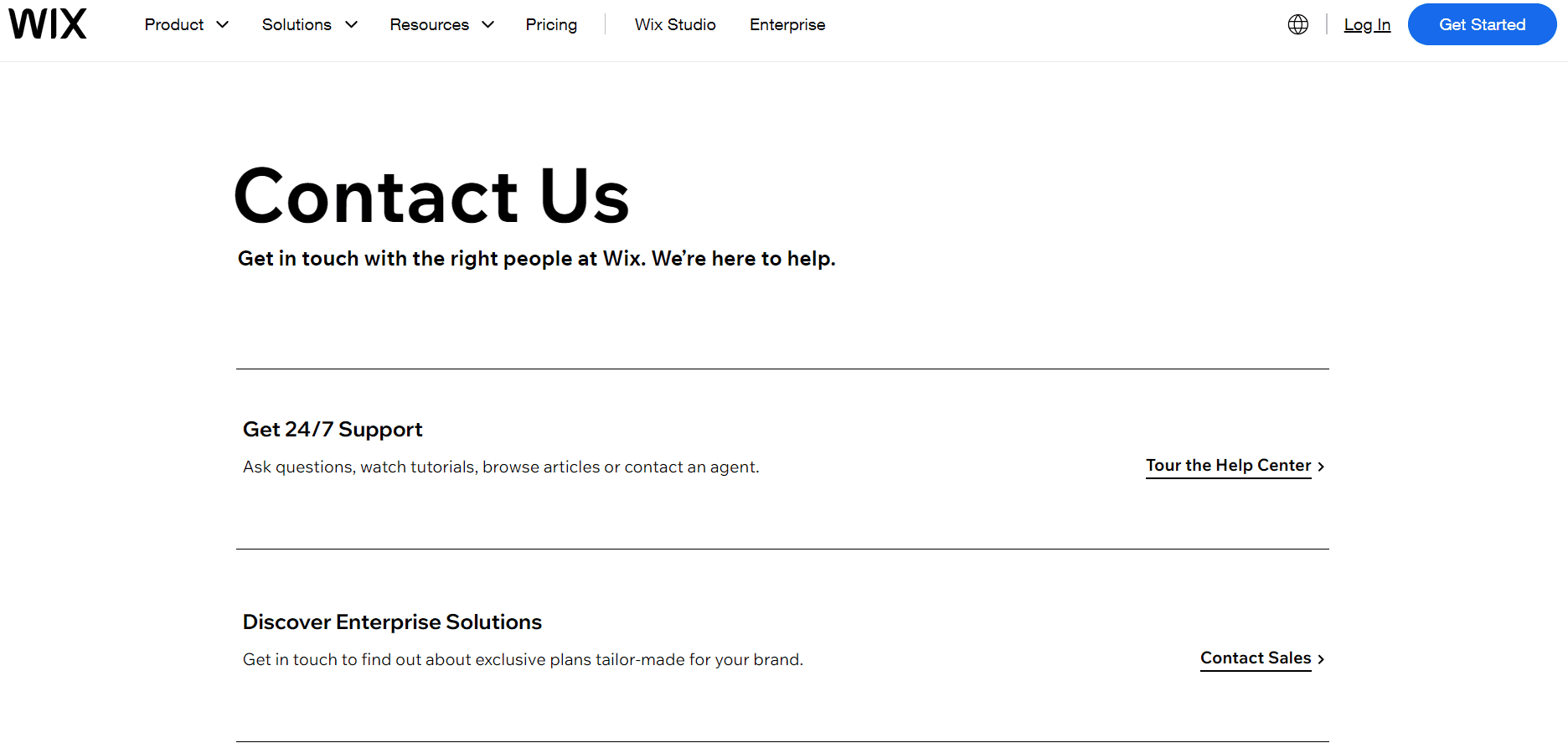
Wix provides direct support, including live chat, email, and a detailed help center. This makes it easy for beginners to get help quickly.
WordPress

WordPress doesn’t have official support since it’s open-source. However, there’s a huge community offering tutorials, forums, and guides to help you solve problems.
Verdict: Wix has better direct support, while WordPress relies on its community-driven resources.
8. Third-Party Extensions
Wix
Wix’s App Market has a solid selection of add-ons to enhance your site’s functionality. However, its options are limited compared to WordPress, and some advanced integrations may not be available.
WordPress
WordPress is a clear winner here, with over 60,000 plugins to choose from. Whether you need tools for SEO, eCommerce, or analytics, you’ll find something that fits your needs.
Verdict: WordPress offers way more options for extensions and advanced features.
8. Blogging
Wix
Wix makes blogging easy with simple features that let you create and publish posts without much hassle. You can organize your content into categories, add pictures and videos, and even tweak the layout to fit your style.
Its drag-and-drop editor is great for beginners, especially if you don’t have technical skills. However, Wix doesn’t offer advanced blogging tools like scheduling posts, detailed analytics, or managing multiple authors. This might be a downside for serious bloggers or teams looking for more functionality.
WordPress
WordPress was built for blogging, and it shows. It’s packed with features like scheduling posts, organizing tags and categories, and supporting multiple authors with different access levels.
You can use plugins to boost SEO, add interactive elements, or even monetize your blog. WordPress is incredibly flexible, so you can customize your blog to fit your exact needs. Whether you’re a hobbyist or running a professional blog, it’s designed to grow with you as your site gets bigger.
Verdict: If you’re serious about blogging, WordPress is the better choice. It’s more powerful, flexible, and offers everything you need to build and grow a professional blog, whether you’re working solo or with a team.
10. eCommerce
Wix

Wix offers a comprehensive set of eCommerce tools designed to help businesses of all sizes build and manage an online store with ease. Here’s a quick overview of its standout features:
- Storefront & Website: Create a professional online store with customizable templates optimized for mobile devices.
- Store Management: Track inventory, manage orders, and enable dropshipping with ease.
- Store Analytics: Monitor sales, customer behavior, and traffic with built-in analytics tools.
- Cart & Checkout: Offer a secure, customizable checkout process with multiple payment options.
- Marketing & SEO: Promote your store with email campaigns, social media ads, and SEO tools to boost visibility.
- Wix Owner App: Manage your store, orders, and customer interactions directly from your phone.
- Products: Easily upload and organize products with images, descriptions, and variations. Supports digital products.
- Payments: Accept secure payments via credit cards, PayPal, Stripe, and more, with Buy Now, Pay Later options.
- eCommerce Apps: Enhance functionality with apps for customer reviews, loyalty programs, live chat, and shipping solutions.
WordPress

WordPress, combined with the WooCommerce plugin, is a great choice for building an online store. It’s super flexible and works for businesses of any size.
You can set up detailed product options, customize shipping methods, and connect with tons of third-party tools to make your store run smoothly. WordPress also gives you the freedom to design your store exactly how you want, so it matches your brand perfectly.
With so many plugins and themes to choose from, it’s easy to add features and grow your store as your business gets bigger. It’s a solid option for anyone looking to take their eCommerce to the next level.
Verdict: WordPress is better for users who need a powerful and scalable eCommerce solution, while Wix is ideal for simpler online stores.
11. Security
Wix
Wix is committed to keeping its users’ websites safe and secure by offering a variety of advanced security features. Here’s a look at some of the key security features that make Wix a trustworthy platform.
Threat prevention
Wix takes security seriously by implementing a Secure Software Development Lifecycle (SDLC) to ensure all software is developed with security as a top priority. Sensitive data is encrypted to create a secure environment for user information.
Wix also provides secure payment options and anti-fraud tools to protect financial transactions and personal data. Continuous monitoring of third-party integrations guarantees they meet Wix’s high security standards.
Real-time detection
Wix uses advanced Anti-DDoS Protection to prevent Distributed Denial of Service (DDoS) attacks. The Security Operations Center (SOC) and Security Information & Event Management (SIEM) systems provide round-the-clock monitoring and threat detection.
With security visibility and data analysis, Wix leverages machine learning to spot patterns and predict potential risks. Additionally, the Bug Bounty Program invites external experts to identify and address vulnerabilities, strengthening the overall security framework.
Rapid response
For quick responses, Wix has a well-structured Incident Response process to address security incidents swiftly. The Business Continuation Plan ensures seamless operations even during security breaches. Regular security training and simulations keep the team prepared to handle potential threats, ensuring a secure environment at all times.
WordPress
With a range of features designed to protect against threats and vulnerabilities, WordPress ensures that your site remains protected at all times. Below are some of the key security features that contribute to WordPress’s strong security framework.
Encryption, by Default
WordPress sites, including custom domains, are secured with SSL by default. This means all data sent between users and your site is encrypted, helping to protect your privacy and security. Additionally, WordPress automatically redirects all insecure HTTP requests to the secure HTTPS version, maintaining a safe environment.
Daily Scans
Jetpack Scan, a built-in security tool, checks your WordPress.com site daily for potential threats. It scans essential components like plugins, themes, uploads, and important files such as wp-config.php. If any vulnerabilities are found, WordPress’s security team quickly resolves them by updating or reverting files as needed.
Data Backup and Recovery
Regular backups are created to safeguard your website data. In case of power outages or natural disasters, WordPress can restore your site quickly. Higher-tier plans provide access to daily backups directly through the dashboard for added convenience.
Firewalls
WordPress uses web application firewalls (WAFs) to monitor and evaluate incoming traffic to your site. These firewalls block unauthorized attempts and suspicious activity, providing an extra layer of protection against attacks and vulnerabilities.
Monitoring Suspicious Activity
WordPress actively monitors web traffic to detect and block suspicious activities. This includes safeguarding against brute force attacks, unwanted login attempts, and DDoS attacks, ensuring your site stays secure.
Security Testing
WordPress also runs a bug bounty program through HackerOne, encouraging external security experts to identify and address vulnerabilities. This ongoing effort helps improve the overall security of WordPress services.
Verdict: Wix offers strong real-time threat management, while WordPress excels in foundational security like encryption and monitoring. Both provide solid protection, but with different approaches.
Factors to Consider When Choosing Between Wix and WordPress
Choosing between Wix and WordPress depends on what you need from your website. Below are some key factors to consider when making your decision:
Skill Level and Learning Curve
Wix is built to be easy to use, offering a simple drag-and-drop interface perfect for beginners. On the other hand, WordPress is more customizable but can have a steeper learning curve due to its complex backend.
If you’re just starting out, Wix might be the better, simpler option. However, if you’re comfortable learning and want more flexibility, WordPress is a great choice.
Budget and Long-term Costs
Wix operates on a subscription model, which covers hosting and maintenance, making it convenient for beginners. However, as your site grows, ongoing costs may add up, especially for larger websites.
WordPress, with its self-hosted option, offers more control and flexibility. While it may involve some upfront costs, it can be more cost-effective in the long run, reducing ongoing expenses.
Website Needs
Wix works well for small to medium-sized websites that need a simple, visually appealing setup. WordPress, on the other hand, is better suited for more complex projects like eCommerce stores, blogs, or large business websites, thanks to its extensive library of plugins and themes. Depending on what your website requires, whether simplicity or advanced feature, one platform may be a better fit.
Scalability and Ownership
WordPress offers strong scalability, allowing you to add features through plugins and custom development as your business grows. Wix provides good scalability within its ecosystem but may have limitations if you want to expand beyond its built-in options. Additionally, WordPress gives you more control over your website’s backend, whereas Wix operates within a more managed environment with less access to the code.
WordPress and Wix Support Services
Ready to keep your website running smoothly? Explore our support plans at SetmySite and find the perfect solution for your WordPress or Wix website. From basic maintenance to advanced custom development, we’ve got you covered.
Upkeep Plan
The Upkeep Plan is perfect for small business owners, bloggers, and website managers who need reliable, ongoing maintenance to keep their WordPress or Wix website running smoothly.
| Website Tasks | Support Features | Upkeep & Security |
| Turnaround time: 1 business day | Expert web team | WordPress updates – daily |
| Edits & updates | Emergency care – 24/7 | Uptime monitoring – every 60 minutes |
| New pages & design | Support tickets | Visual monitoring – 1 page |
| Fixes & troubleshooting | Sticky note tool | Malware scans & removal – unlimited |
| Website down / broken | Support time – 60 minutes per month | Security firewall – 24/7 |
| Speed optimization | Rollover time – up to 2 hours | Website backups – daily |
| 3rd party integrations (basic) | Saved backups – 90 days | |
| SEO / Google fixes | Monthly reports | |
| Full website audit |
Webmaster Plan
The Webmaster Plan is ideal for businesses and website owners who require more extensive support and customization.
| Website Tasks | Support Features | Upkeep & Security |
| Turnaround time: 1 business day | Expert web team | WordPress updates – daily |
| Edits & updates | Emergency care – 24/7 | Uptime monitoring – every 30 minutes |
| New pages & design | Support tickets | Visual monitoring – 3 pages |
| Fixes & troubleshooting | Sticky note tool | Malware scans & removal – unlimited |
| Website down / broken | Support time – 120 minutes per month | Security firewall – 24/7 |
| Speed optimization | Rollover time – up to 4 hours | Website backups – daily |
| 3rd party integrations (basic) | Phone support | Saved backups – 90 days |
| SEO / Google fixes | Video call / screen share | Monthly reports |
| Full website audit | Dedicated website manager | |
| Events & tickets | ||
| Simple eCommerce |
Advanced Plan
If you need full support and tailored solutions, this plan provides everything you need to keep your website running smoothly and securely.
| Website Tasks | Support Features | Upkeep & Security |
| Turnaround time: 1 business day | Expert web team | WordPress updates – daily |
| Edits & updates | Emergency care – 24/7 | Uptime monitoring – every 30 minutes |
| New pages & design | Support tickets | Visual monitoring – 5 pages |
| Fixes & troubleshooting | Sticky note tool | Malware scans & removal – unlimited |
| Website down / broken | Support time – 180 minutes per month | Security firewall – 24/7 |
| Speed optimization | Rollover time – up to 6 hours | Website backups – daily |
| 3rd party integrations (basic) | Phone support | Saved backups – 90 days |
| SEO / Google fixes | Video call / screen share | Monthly reports |
| Full website audit | Dedicated website manager | |
| Events & tickets | ||
| Simple eCommerce | ||
| Advanced eCommerce | ||
| Membership sites | ||
| Complex functions | ||
| Custom development |
Final thoughts
Deciding between Wix and WordPress comes down to what works best for you. Wix is simple and user-friendly, perfect for beginners or anyone looking for a straightforward website. Meanwhile, WordPress offers more flexibility and customization, making it a great option if you need advanced features and full control over your site.
Take the next step in building your perfect website! Wix offers simplicity, and WordPress provides advanced options—we can help you decide which is right for you. Contact us today to get started!
FAQs
Is Wix better than WordPress?
It depends on what you’re looking for. Wix is great for beginners who need something simple and easy to use. WordPress is better if you want more control, flexibility, and room to grow. Think about your budget, skills, and long-term goals to decide which one fits you best.
Is Wix a part of WordPress?
No, Wix and WordPress are completely different. Wix is a drag-and-drop website builder that’s easy to use, while WordPress is an open-source platform that gives you more customization options but requires hosting. They serve different purposes and are not connected in any way.
What is the downside of Wix?
Wix can get expensive as you add more features or grow your site. It’s also less flexible than WordPress when it comes to customizations, and moving your site to another platform can be tricky. If you need a highly scalable website, Wix might not be the best choice.
What is the best alternative to a WordPress website?
Squarespace is a great option with beautiful templates and an easy-to-use platform. It’s similar to Wix but offers more design flexibility. For simplicity, you could try Weebly, or if you want something closer to WordPress, Joomla is a solid choice.